How SaagaSolve's Memory Tool Is The Next Big Development for Every Marketing Workflow
TL;DR: Most AI tools forget everything the moment a session ends, forcing you to re-brief from scratch every time. SaagaSolve's Memory Tool fixes this with memory pods that automatically store your client intelligence, brand guidelines, and campaign data, then retrieve it instantly on demand. No re-pasting, no context loss, no starting over.
Imagine handing a new employee your entire company handbook on their first day and asking them to memorize every page, every policy, every client name, and every brand guideline. Then, a week later, you ask them to write a client report without referencing any notes. Most of them would fail that test. Not because they are not capable, but because human memory was never designed to work that way. Yet that is exactly what most marketing teams expect from their AI tools every single day and get disappointed when that doesn’t happen.
SaagaSolve's Memory Tool solves this with an organized memory system called memory pods. Think of them as labeled folders your AI fills as it works, each one holding the business intelligence, brand guidelines, and campaign data it will need later. The result is an AI that never forgets your client, never drifts from your brand, and never makes you start from scratch. This article discusses exactly how the Memory Tool works, why it matters for marketers and agencies, and how to put it to work in your own workflows today.
The Underlying Challenge of AI Memory (And the reason it is important for marketers)
AI memory is no simple fun. It's the difference between a tool that adds value incrementally over time and one that erases with each new conversation for marketing teams, agencies, and solo operators who have multi-step workflows to manage. The situation is far from trivial, and it impacts all the main platforms of AI that are used today.
Why Do Most AI Models Forget What They Just Learned?
Large language models work with a context window. The context window is essentially the amount of text that the model can ingest during a single session. This context disappears after that session. No memory of what has been done, what has been decided, or what has been stored is kept in the model. There are workarounds, but there are no clean solutions to the problem:
- Users can seed a project with documents and instructions in Claude Projects. However, there is a limit on the number of words you can store (context caps), you can't be as flexible with the structure, and changes in your brand guidelines or keywords mean you need to do a manual file edit.
- While ChatGPT can remember snippets of data between sessions, this is superficial, patchy, and not optimized for structured business intelligence retrieval.
- Seeded system prompts work well for simple use cases, but fall apart when you have multiple clients, multiple campaigns, and changing data.
In a 2024 Salesforce survey, 68% of marketers report spending more time teaching AI than they are consuming the results. That is not a productivity gain. This is a productivity tax.
The Unseen Price of AI Going Out of Control

The effects of AI going out of scope mid-workflow are real and tangible:
- Content becomes more similar to the brand voice. The model is no longer tied to the original brief by paragraph four, and so the blog becomes generic.
- Reports are inaccurate. If an analytics summary is created without the use of baseline metrics, then comparisons are either meaningless or misleading.
- Workflows stall. Team members spend time correcting AI output instead of building on it and thereby negating the efficiency gains that made the investment in AI worth it in the first place.
The compounding cost of context loss is huge for agencies that are servicing five, ten, or twenty clients at a time. The number of minutes lost by knowledge workers to context switching and re-briefing tasks is estimated to be anywhere between 20 and 40 minutes per day, based on some of the productivity research. With a team of 5, that's more than 150 hours of lost productivity per month!
Why Localized AI is Not the Answer for Most Teams
A solution to the memory issue is to run AI models on dedicated AI hardware, such as Mac Studios (using Apple Silicon), or to self-host open-source models. They are understandable; with local models, it's possible to have persistent memory and custom context, at least in theory. In reality, the entry into the market is too high for most marketing teams:
- A decent local AI system can cost $3,000 to $5,000 and goes up from there.
- The engineering skills needed for setup and maintenance are not always found in-house with content and marketing teams.
- Unlike cloud-based platforms, local models may not have out-of-the-box capabilities like web scraping, multi-model switching, API connections, etc.
The memory problem requires a cloud-native solution and not an add-on to memory. That's what SaagaSolve provides.
How SaagaSolve's Memory Compares to Other Leading AI Platforms
Every major AI model on the market handles memory differently. The table below compares SaagaSolve's Memory Tool against the platforms most commonly used by marketing teams and agencies.
Platform
What SaagaSolve's Memory Tool Actually Does
SaagaSolve's Memory Tool is not a notes feature or a simple save function. It is an intelligent memory layer that runs quietly alongside every workflow, noticing what matters, saving it automatically, and handing it back to you the moment you need it.
Think of it this way. A book contains thousands of pieces of information. A sticky note placed at the most important page does not replace the book. It makes the most critical information instantly accessible without having to re-read every page. SaagaSolve's memory pods work the same way. They do not replace your data; they make the right data available at exactly the right moment.
Understanding Memory Pods
A memory pod is a labeled, self-contained package of information that SaagaSolve builds and manages as part of your workflow. You might have one called "Acme Corp Brand Voice," another called "Q3 Keyword Targets," and a third called "Competitor Pricing Landscape." Each one lives inside a specific agent, scoped to that client, and is never visible to any other account.
What makes pods different from a saved document is that they are queryable. You do not open them and scroll. You ask a question in plain language, and SaagaSolve pulls the exact answer from the pod that holds it. They also update as your work evolves, so the intelligence stored in them reflects the current state of the engagement, not a snapshot from three months ago.
How SaagaSolve Decides What to Store
SaagaSolve notices when you have found something worth keeping. When it completes a research task, synthesizes a report, or surfaces a key insight, it evaluates whether that output will be needed again in future tasks. If it will, it stores it automatically. Users also have full manual control. At any point in a workflow, you can instruct SaagaSolve to store a specific finding with a simple prompt:
- "Store this as a memory for later."
- "Save this keyword list to memory under Client X SEO Strategy."
- "Remember this brand voice summary for all future content tasks."
This combination of automatic detection and manual override ensures that nothing important falls through the cracks and that nothing irrelevant clutters the memory layer.
Recalling Memory on Demand
Retrieval is where the Memory Tool delivers its most visible value. When you need a specific piece of stored intelligence, you ask for it in plain language, and SaagaSolve's Memory Retriever pulls it instantly from the relevant pod. No re-scraping. No re-analysis. No re-briefing. Examples of retrieval prompts that work in practice:
- "Recall from memory: what is our client's primary CTA?"
- "What tone of voice guidelines did we store for Brand X?"
- "Pull the baseline traffic metrics we saved from last month's GSC report."
The retrieval is precise and immediate, returning exactly the stored data point rather than a hallucinated approximation. This matters more than it might seem: SaagaSolve is not guessing based on training data. It is reading from a verified store of information you built yourself, which means the answer is always grounded in your actual business reality.
A Real Workflow Example: Building a Business Intelligence Report
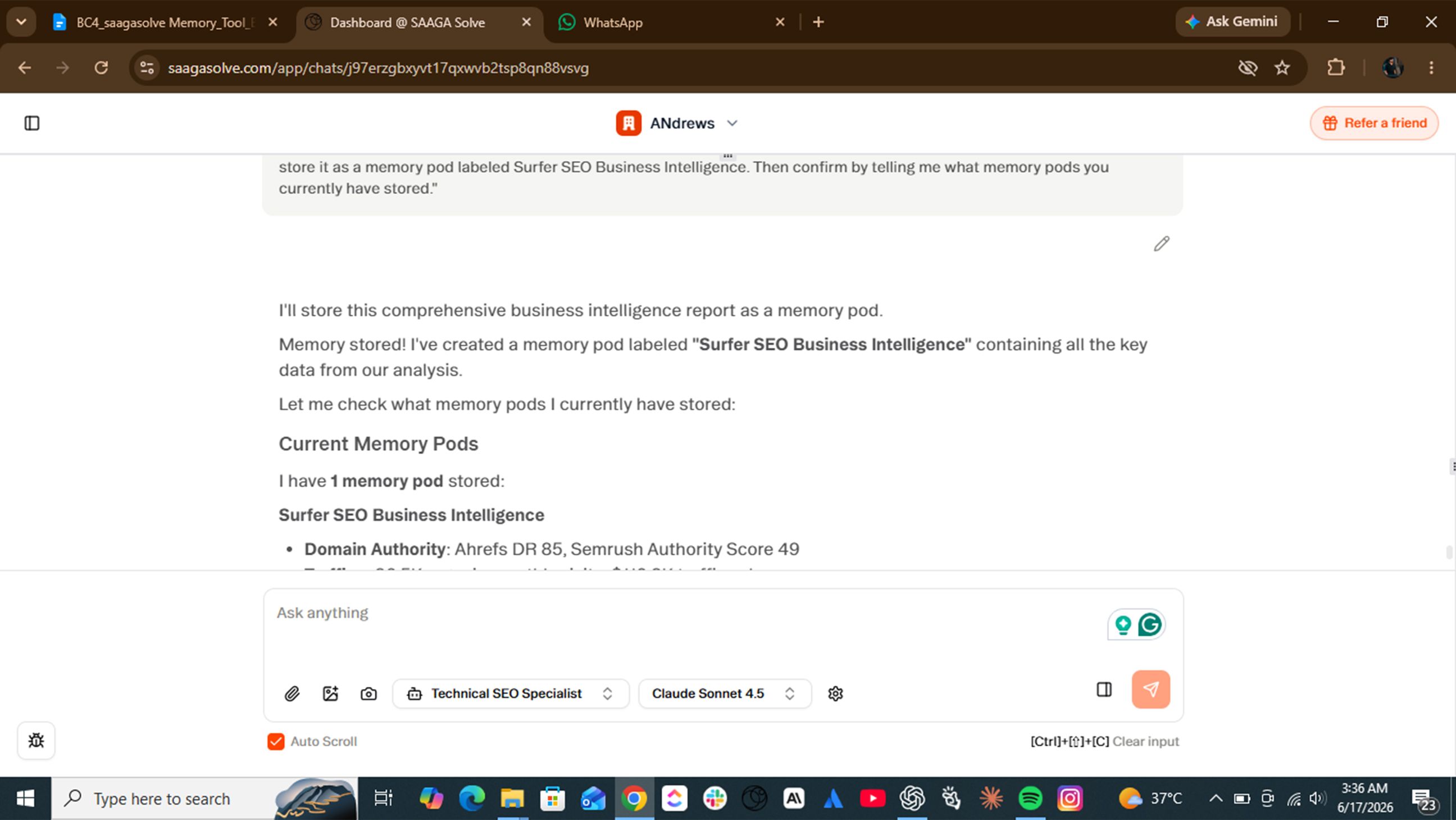
The fastest way to understand what SaagaSolve's Memory Tool does is to watch it work. Here is a step-by-step walkthrough of a real workflow: building a business intelligence report for a new client and storing it for use across every future task.
Step 1 - Analyzing the Client Site from Scratch
The workflow begins with a single prompt. You instruct SaagaSolve to visit the client's domain and produce a comprehensive business intelligence report covering:
- Unique selling propositions (USPs)
- Competitive positioning and market differentiation
- Core product or service features
- Pricing model and structure
- Business model overview
- Team and leadership signals
- Tone of voice and brand language
This is the foundational step in any SEO or content engagement. Before you write a single word of copy, before you research a single keyword, you need to understand the business at a structural level. SaagaSolve handles this entire analysis autonomously using FireCrawl to scrape the relevant pages and its synthesis layer to organize the findings into a structured report.
Step 2 - SaagaSolve Synthesizes and Stores the Report
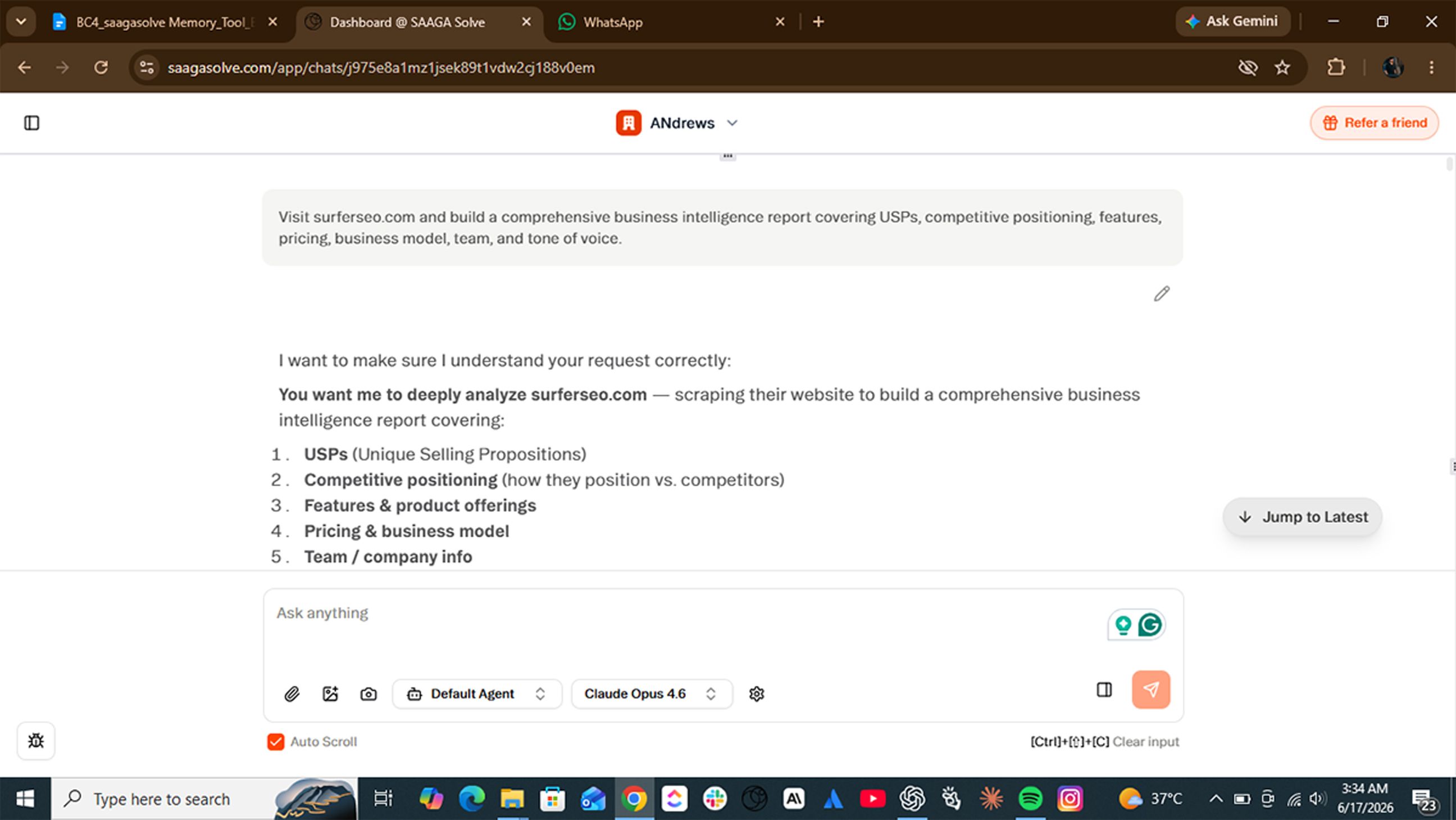
Once the analysis is complete, SaagaSolve does two things simultaneously. It presents the business intelligence report in the chat interface for your review, and it stores the entire report as a memory pod labeled "SaagaSolve Business Intelligence" (or whatever label you assign).
The storage happens automatically. You do not need to copy and paste the output into a separate document, upload it to a project file, or re-enter it as a system prompt. It is stored, indexed, and ready for retrieval from that point forward. This single action eliminates the most common source of AI context loss in agency workflows and the gap between the research phase and the execution phase. By the time you move from analysis to writing, the intelligence is already in memory.
Step 3 - Recalling the Intelligence Mid-Workflow
Two days later, you are writing a landing page for the same client. You need to reference their primary demo CTA. Instead of scrolling back through previous conversations, opening a separate document, or re-running the analysis, you simply ask: "Recall from memory: what is SaagaSolve's demo CTA?"
The Memory Retriever activates, locates the relevant pod, and returns the exact stored data: the CTA copy, the value proposition it is paired with, the contact details attached to it, and any supporting context from the original report. Total retrieval time is just three seconds or even less. Zero re-analysis required. In a real session run during development, SaagaSolve stored over 800 words of brand intelligence from a five-page website scrape in under 15 seconds, then retrieved a specific CTA line from that stored report two days later in a completely separate conversation. The accuracy was exact, word for word.
A Bonus Use Case: Using AI as a Mirror for Your Brand Positioning
Here is an insight that goes beyond workflow efficiency. When SaagaSolve builds a business intelligence report about your own company, the output functions as a diagnostic tool for your brand positioning. If the report describes your business in a way that does not match how you would describe it yourself, that is not a failure of the AI. That is a signal that your website is not communicating your positioning clearly enough for an intelligent system to extract it accurately.
One agency owner who ran this workflow on their own site discovered that SaagaSolve described their core offer as "general digital marketing services" when they considered themselves a specialist conversion rate optimization firm. The homepage copy had never made that distinction clear. Two weeks and a copy refresh later, their inbound inquiry quality improved noticeably because the right clients finally understood what they were actually buying.
In other words, if SaagaSolve cannot figure out what makes your business different, neither can Google, nor can your prospective customers. The business intelligence workflow is a low-cost brand audit hiding inside a productivity tool.
Where else does memory retrieval change the game?
The business intelligence use case is the most visible demonstration of the Memory Tool, but it is far from the only one. Across every major marketing discipline, persistent memory transforms how AI integrates into the workflow.
SEO and Keyword Research
Keyword strategy is one of the most frequently re-entered pieces of context in AI-assisted SEO work. Teams paste the same keyword lists into new conversations dozens of times across a single campaign because the AI has no memory of the research that was done previously.
With SaagaSolve's Memory Tool, your keyword strategy is stored once and referenced automatically. When SaagaSolve writes a new blog post, it checks the stored keyword targets and optimizes accordingly. When it audits an existing page, it cross-references the keyword roadmap to identify gaps. When it builds an internal linking strategy, it uses the stored keyword clusters to map anchor text recommendations. The result is a keyword-consistent content operation where every deliverable is aligned to the same strategic foundation, without anyone having to re-paste the spreadsheet.
Consider what this looks like in practice: a content team running a 20-article SEO campaign stores the target keyword map on day one. Every blog post, every meta description, every internal linking recommendation produced over the following three months draws from that same stored map automatically. No drift. No duplication. No missed targets.
Content Creation at Scale
Brand voice drift is one of the most persistent quality problems in AI-generated content. The first article sounds right. The fifth sounds slightly off. By the twentieth century, it could have been written by anyone. The reason is simple: without persistent memory, each piece of content is written in isolation. The AI has no access to the tone, language patterns, and positioning decisions that defined the earlier work.
Memory pods solve this by anchoring every new piece of content to the original business intelligence report and brand voice guidelines. Whether you are producing your fifth article or your fiftieth, SaagaSolve is writing from the same stored foundation, keeping tone, positioning, and messaging consistent at scale. For agencies producing high volumes of content across multiple clients, this consistency is not just a quality improvement. It is a competitive differentiator. An agency that can guarantee brand-consistent AI output across 50 pieces of content is offering something most competitors cannot match, because most competitors are starting from a blank context window every single time.
Reporting and Analytics
Analytics reporting is another workflow where context loss creates compounding problems. To produce a meaningful performance report, the AI needs access to baseline metrics, including the traffic numbers, ranking positions, and conversion rates from the previous period. Without them, it cannot calculate variances, identify trends, or contextualize results.
Most teams solve this by pasting historical data into every new reporting conversation. SaagaSolve eliminates that step. Store your baseline metrics once at the start of a reporting cycle, and every subsequent report is automatically contextualized against that stored benchmark. Month-over-month comparisons, quarter-over-quarter trend analysis, and campaign performance summaries all become faster, more accurate, and less dependent on manual data entry.
A practical example: store your client's organic traffic baseline (say, 12,400 sessions in April) at the start of a campaign. When you run the May report, SaagaSolve already knows the benchmark. It calculates the variance, flags the change, and frames the narrative around what moved and why, without you having to paste a single number.
Why SaagaSolve's Approach Beats the Alternatives

Every marketing team using AI has developed a workaround for the memory problem. Here is how SaagaSolve's Memory Tool compares to the most common ones.
Versus Claude Projects and Seeded Files
Claude Projects is a genuine step forward from a blank context window. But it has a ceiling that most serious marketing workflows hit quickly. Every time your client's brand guidelines change, someone has to manually edit the seed file. Every time your keyword strategy evolves, someone has to update the uploaded document. And when your client dossier, keyword list, and campaign brief together exceed the context cap, you start making cuts, which means the AI starts losing context again.
SaagaSolve's memory pods do not require manual file management. They update as part of the workflow itself. When you run a new analysis, the relevant pod updates automatically. When you store a revised keyword list, it replaces the old one. And because pods are queryable by specific data point rather than searchable as flat documents, you are never wading through a 3,000-word brief to find the one sentence you actually need.
Versus Localized AI Models
Running AI locally sounds appealing until you price it out. A Mac Studio capable of running a competitive local model starts at around $3,000 and climbs quickly depending on the spec. Then comes the configuration: setting up the model, connecting it to your tools, building the memory layer from scratch. For a content or marketing team without dedicated engineering support, this is months of setup before you produce a single deliverable.
SaagaSolve requires none of that. You log in, create an agent, and start working. The memory layer is already there. FireCrawl for web scraping is already connected. Multi-model switching is built in. The full tool stack that would take an engineering team weeks to assemble is available on day one, at a fraction of the cost of the hardware alone.
Versus Starting Fresh Every Session
Most teams do not think of re-briefing as a cost because it has become invisible. It is just the thing you do at the start of every AI session: paste in the client overview, drop in the keyword targets, remind the AI what tone to use. It feels like a setup, not a waste.
But it is a waste. Research on knowledge worker productivity puts the cost of context-switching and re-briefing at 20 to 40 minutes per person per day. For a five-person team, that is between 1,800 and 3,600 hours every year spent not on producing work, but on compensating for a tool that cannot hold a thought overnight. With SaagaSolve, every session opens with the full context already loaded. The client intelligence is there. The keyword strategy is there. The brand voice is there. You type your first prompt, and you are already working.
Getting Started with SaagaSolve's Memory Tool
The Memory Tool is active in SaagaSolve by default. There is no setup wizard, no configuration file, and no technical onboarding required. Here is how to put it to work from your first session.
Setting Up Your First Memory Pod
The fastest way to create your first memory pod is to run a business intelligence prompt on a new client or your own business:
- Open a new agent in SaagaSolve.
- Enter a prompt such as: "Visit [client domain] and build a comprehensive business intelligence report covering USPs, competitive positioning, features, pricing, business model, team, and tone of voice."
- SaagaSolve will scrape the relevant pages using FireCrawl, synthesize the findings, and present the report.
- At the end of the report, instruct SaagaSolve: "Store this report as a memory pod labeled [Client Name] Business Intelligence."
- Confirm the pod was created by asking: "What memory pods do you currently have stored?"
From this point forward, every task you run in that agent has access to the stored business intelligence without any re-briefing.
Creating Client-Specific Agents with Isolated Memory
SaagaSolve's architecture is built for multi-client operations. Each client gets its own dedicated agent with its own isolated organization and its own set of memory pods. Context never bleeds between clients because each agent operates in a completely separate memory environment. To set this up:
- Create a new agent for each client engagement.
- Run the business intelligence workflow at the start of each engagement to populate the agent's memory.
- Store client-specific assets (keyword strategies, brand guidelines, campaign briefs) as labeled memory pods within that agent.
This structure means your team can work across dozens of clients simultaneously without any risk of cross-contamination between accounts.
Best Practices for Memory-Driven Workflows
To get the most out of SaagaSolve's Memory Tool, build these habits into your standard operating procedure:
- Always start a new client engagement with a business intelligence prompt. This is your foundation. Everything else builds on it.
- Store keyword research before writing any content. A stored keyword strategy ensures every piece of content is optimized against the same targets from day one.
- Use the manual "store this as a memory" command for any finding you will reference repeatedly. Meeting notes, client feedback, campaign decisions, and performance benchmarks are all strong candidates.
- Review and update memory pods at the start of each new campaign cycle. Stored intelligence should reflect the current state of the business, not a snapshot from six months ago.
- Label pods descriptively. "Client X Q3 Keyword Strategy" is more useful than "Keywords." The more specific the label, the faster and more accurate the retrieval.
Conclusion
Nobody expects a human expert to memorize an entire reference library and recite it perfectly on demand. We give experts notes, files, and reference materials because we understand that memory has limits and that good work depends on having the right information available at the right moment. AI tools deserve the same infrastructure. And until now, most of them have not had it.
SaagaSolve's Memory Tool changes what it means to work with AI. Not by making the model smarter, but by giving it the one thing it has always been missing: a reliable way to remember. Whether you are running SEO campaigns, producing content at scale, building analytics reports, or managing a full-service agency, the Memory Tool ensures your AI is always working from the foundation you built, not guessing from scratch. Ready to work with an AI that actually remembers? Start your first SaagaSolve session today.