TL;DR
After helping hundreds of small businesses over the past decade, I've come to know that the right SEO tools can either make or break your online success. You don't need enterprise-level software; I will discuss just smart, affordable tools that actually move the needle on rankings and traffic.Through this guide, I will share my honest thoughts with you. I remember it was 2014 when I started my SEO consulting journey. It was the time when most small business owners came to me completely overwhelmed. They'd heard SEO was important, tried a few things on their own, and hit a wall faster than I could even say "keyword density."
So, what I see happening over and over is that business owners know they need better Google rankings, but they're flying blind. They'll optimize a few pages based on gut feeling, maybe stuff some keywords here and there, then wonder why nothing happens after three months.
The truth about this? So listen, SEO without data is just expensive guessing.
That's where the right SEO software comes in. I'm not talking about those $500/month enterprise platforms that most small businesses can't justify. I mean practical, affordable tools that give you the insights you actually need to compete.
How do Small Business SEO Tools Actually Help You?
Consider that you are attempting to rank your local bakery as the best wedding cakes in Denver. Lacking tools, you are just throwing darts in the dark. You can:
- Identify specifically what your competitors are ranking for (and steal their most valuable ones)
- You need to know what is working by tracking your rankings each week.
- Discover technical problems silently killing your search visibility.
- Find content ideas that your customers are seeking.
- Measure your local search performance and Google My Business.
The first time I showed this data to most of the small business owners, they were shocked. One client even informed me, "I did not even know that my largest rival was ranking in 500+ keywords that I never even considered.” 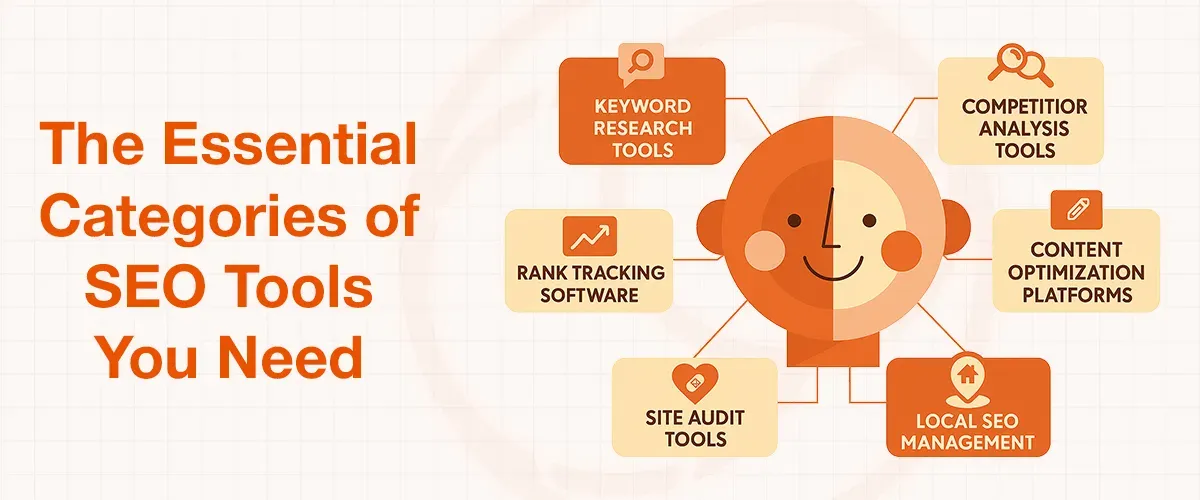
The Essential Categories of SEO Tools You Need
I have categorized the SEO tools into six groups that are of utmost importance to small businesses over the years. Each category does not require the use of tools, but it is better to be familiar with all the tools to make smarter choices.
Keyword Research Tools
A keyword research tool assists you in locating what people are really searching for. I do not know how many businesses I have come across that are optimizing based on terms that are not even typed in Google.
Rank Tracking Software
Imagine that you can have a dashboard that tracks your keywords on the increase (or decrease) every week. That is rank tracking.
Site Audit Tools
You can consider them as health checks of your site. They will identify technical issues that damage your ratings, such as slow-loading web pages, broken links, or missing meta descriptions.
Competitor Analysis Tools
This is my own favourite category. The tools essentially allow you to monitor the way your competitors are doing their SEO and imitate them.
Content Optimization Platforms
Content optimization tools scan what you write and recommend how to improve it to be ranked higher. Others even inform you how many times to apply your target keyword.
Local SEO Management
If you serve customers in particular areas, then these tools will assist you in dominating local search results and controlling your Google My Business page.
My Honest Review of the 8 Best SEO Software for Small Business
I have tested, compared, and reviewed the top SEO tools for small businesses to help you make informed decisions for your growth. Each tool has been evaluated based on ease of use, features, pricing, and overall value for money. This ensures you get a clear understanding of what works best for your specific business needs and goals.
The all in one must have tool
The all in one must have tool
Semrush
I have been using Semrush for over eight years with my clients, and it’s my top competition analyzer. The keyword gap tool alone has assisted dozens of my customers in finding hundreds of ranking opportunities, which they had never heard of before.
But there is a downside as well. It is expensive for minor businesses. However, if you can afford it, the ROI tends to pay off within a few months.
Best For: Comprehensive SEO analysis and competitor research
Price:
- Pro: $139.95/month
- Guru: $249.95/month
- Business: $499.95/month
Pros:
- All-in-one SEO platform: Covers keyword research, site audits, backlink analysis, and competitor insights in one platform.
- Powerful competitor analysis: Has one of the best and most detailed insights on your competition that helps you uncover competitors’ keywords, traffic sources, and strategies.
- Comprehensive data & features: Offers extensive keyword databases, rank tracking, and content optimization tools.
Cons:
- Expensive pricing: Paid plans are among the highest in the SEO tool market.
- Steep learning curve: The interface can feel complex and overwhelming for beginners.
- Limited free plan: The free version has restricted features and usage limits.
Ahrefs
The backlink database of Ahrefs is the most advanced one I have ever used. Their Content Explorer feature is incredible in locating content ideas, which subsequently, receive traffic. It’s a great way to figure out what your audience is interested in and how to create leads and sales through it.
Best for: Backlink analysis and content research
Price:
- Lite: $129/month
- Standard: $249/month
- Advanced: $449/month
Pros:
- Industry-leading backlink analysis: Known for having one of the largest and most accurate backlink databases.
- Powerful keyword research tools: Offers advanced keyword insights, traffic estimates, and content opportunities.
- Comprehensive SEO toolkit: Includes site audits, rank tracking, competitor analysis, and content research in one platform.
Cons:
- Expensive pricing: Plans can be costly, especially for small businesses and freelancers.
- No free trial: Users can’t fully test the platform before committing.
- Learning curve: Interface and data depth can be overwhelming for beginners.
Moz Pro
Compared to other options, Moz is more user-friendly, and thus suitable to be used by owners of small businesses who wish to take care of SEO by themselves. They have strong local SEO tools that are fully capable of taking your business to new heights.
Best for: Local SEO and beginner-friendly interface
Price:
- Starter: $49/month
- Standard: $99/month
- Medium: $179/month
- Large: $299/month
Pros:
- Beginner-friendly interface: Easy to use, making it ideal for small businesses and SEO beginners.
- All-in-one SEO toolkit: Includes keyword research, site audits, rank tracking, and backlink analysis in one platform.
- Trusted SEO metrics: Metrics like Domain Authority (DA) and Page Authority (PA) are widely recognized in the industry.
Cons:
- Smaller data and keyword database: Offers fewer keyword insights and less frequent backlink updates compared to competitors.
- Limited advanced features: Lacks depth in competitor analysis and advanced SEO capabilities.
- Data accuracy & freshness issues: Backlink index and rank tracking updates can be slower or less accurate.
Screaming Frog SEO Spider
It may look complex at first, but this tool is incredibly effective at uncovering technical SEO issues. I’ve seen firsthand how fixing problems identified by Screaming Frog helped a client double their traffic. It’s not the most visually appealing tool, but it gets the job done exceptionally well.
Best for: Technical SEO audits
Price:
- Free (limited) or £199/year
Pros:
- Powerful technical SEO crawler: Identifies issues like broken links, duplicate content, redirects, and missing metadata with great accuracy.
Highly customizable & rel="noopener noreferrer" href="https://search.google.com/search-console/about">Search Console will always be a significant part of your toolkit whether it comprises of just one tool or a hundreds. It is free, it is directly powered by Google, and it displays to you the keywords that are generating your traffic. I do this at the end of each month for each client.
Best for: Performance analysis and results tracking
Price: Free
Pros:
- Completely free with real Google data: Provides first-party insights directly from Google, making it highly reliable for SEO decisions.
- Strong performance & indexing insights: Helps track clicks, impressions, rankings, and detect indexing or technical issues easily.
- Essential for technical SEO monitoring: Features like URL inspection and Core Web Vitals help identify and fix critical website issues.
Cons:
- Limited features & no competitor data: Only shows your own website data and lacks competitor analysis or keyword discovery.
- Data limitations & delays: Data is not real-time and may be sampled or limited to ~16 months of history.
- Learning curve for beginners: Interface and reports can be confusing without basic technical SEO knowledge.
BrightLocal
BrightLocal is an excellent choice for local businesses. I use it to track local rankings across different cities and optimize Google Business Profiles effectively. One of my restaurant clients saw a 40% increase in local visibility within just three months after implementing its insights.
Best for: Local SEO and reputation management
Price:
- Track visibility: $29/month
- Manage listings: $37/month
- Grow reputation: $44/month
Pros:
- Specialized for local SEO: Excellent for tracking local rankings, managing citations, and improving visibility in specific locations.
- All-in-one local marketing toolkit: Combines rank tracking, audits, review management, and reporting in one platform.
- User-friendly for small businesses: Easy-to-use dashboard and affordable plans make it accessible for beginners and agencies.
Cons:
- Clunky or outdated interface: Some users find the UI less modern and workflows slightly inefficient.
- Extra costs for key features: Citation building and other services often require additional credits or fees.
- Limited integrations & performance issues: Fewer third-party integrations and occasional slow reports or data inconsistencies.
Ubersuggest
Neil Patel’s Ubersuggest offers solid keyword research capabilities at a much more affordable price compared to premium SEO platforms. It’s especially well-suited for small businesses just starting their SEO journey. With a clean interface and strong core features, it covers the essentials effectively without overwhelming users.
Best for: Budget-friendly keyword research
Price:
- Individual: $12/month
- Business: $20/month
- Enterprise: $40/month
Pros:
- Affordable and beginner-friendly: One of the most budget-friendly SEO tools, making it ideal for small businesses and beginners.
- Solid keyword research features: Provides essential data like search volume, SEO difficulty, and keyword ideas for content planning.
- Easy-to-use interface: Clean and simple dashboard that makes SEO tasks more accessible, even for non-experts.
Cons:
- Limited data depth: Lacks the advanced insights and database size of tools like Ahrefs or Semrush.
- Weaker competitor analysis: Doesn’t provide detailed competitive intelligence or advanced backlink analysis.
- Data accuracy concerns: Metrics and estimates can be less reliable compared to premium SEO tools.
How to Choose the Right SEO Software for Your Business
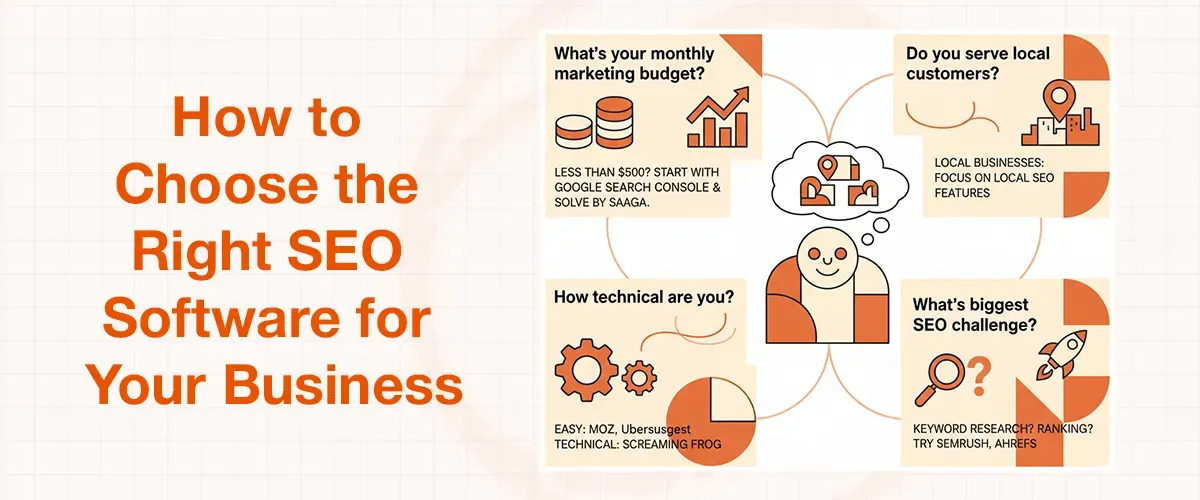 I have come up with a basic structure since I have assisted hundreds of small enterprises in selecting their initial SEO tools. Here are the questions that you need to ask yourself.
What's your monthly marketing budget?
When you are spending less than $500/month in total on marketing, then start with free services such as Google Search Console and consider budget-friendly services such as SOLVE BY SAAGA.
Do you serve local customers?
Local businesses do not require the same tools as e-commerce sites. Focus on local SEO characteristics when the majority of your customers belong to your city or region.
How technical are you?
Some tools demand more SEO knowledge than others do. Moz and Ubersuggest are easier to use, but Screaming Frog requires technical knowledge of SEO.
What's your biggest SEO challenge?
Having difficulties with keyword research? Start there. Don't know why you are not ranking? Obtain powerful software such as SEMrush or Ahrefs.
How much time can you dedicate?
More powerful tools must take time. Always be realistic about what you have the capability of using. My advice to clients is always to utilise one tool well rather than to spend money on three tools they never even lay a finger on. And here, too, I would recommend the same.
Your 30-Day Action Plan with SEO Tools
These are the tasks that I perform with my new clients during their first month:
Week 1: Set up the foundation
- Install Google Search Console and Google Analytics
- Run a basic site audit with your chosen tool
- Fix any critical technical issues (broken links, missing title tags)
Week 2: Research your keywords
- Use your keyword tool to find 20-30 relevant search terms
- Analyze what your top 3 competitors rank for
- Create a list of content ideas based on keyword gaps
Week 3: Optimize existing content
- Update your most important pages with target keywords
- Improve meta descriptions and title tags
- Add internal links between related pages
Week 4: Start tracking and planning
- Set up rank tracking for your target keywords
- Plan your content calendar for the next month
- Schedule monthly SEO audits to catch new issues
The key to being ranked top is consistency. I'd rather recommend you use basic tools every week than use expensive software once a month.
Conclusion
After a decade of helping small businesses navigate the SEO world, I truly want you to remember: the best seo software for small business is the one you'll actually use consistently.
Start by picking one or two tools that you think can address your biggest challenges. Use them for at least three months before moving to any other one or deciding whether to expand your toolkit. I am asking you to follow this because I've seen too many business owners who buy expensive software, then use it for a few weeks and abandon it when results don't appear overnight.
I want you to be clear about SEO; it is a marathon. But with the right small business seo tools that give you direction, you would definitely be able to reach the finish line faster than you think.