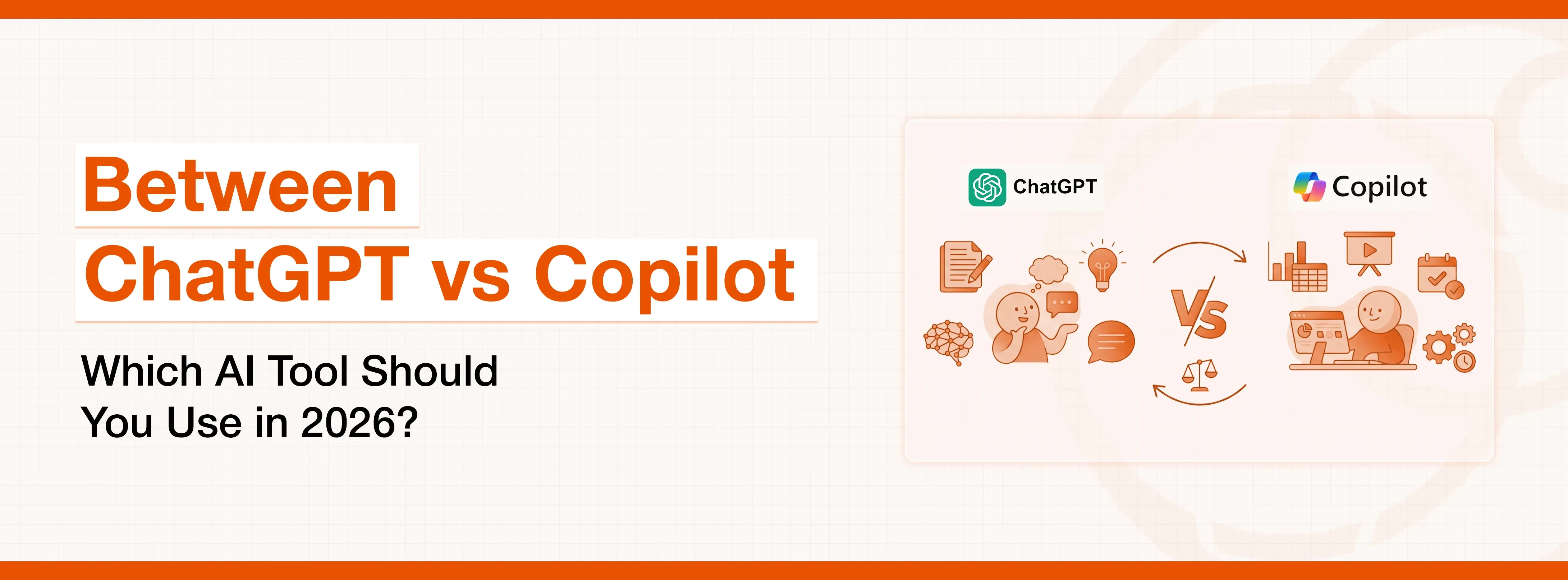
ChatGPT and Microsoft Copilot are two powerful AI tools designed for different purposes. ChatGPT excels in creative tasks such as content writing, SEO research, coding, and brainstorming, offering flexibility as a standalone AI platform. In contrast, Copilot is built to enhance productivity within the Microsoft 365 ecosystem, helping users draft documents, analyze data, and summarize meetings directly inside apps like Word, Excel, and Outlook. The best choice depends on your workflow.
It’s impossible not to mention Microsoft Copilot when making a list of popular AI tools these days. AI assistant built into Microsoft 365 apps, Copilot helps you get things done faster by writing content, analysing data, creating presentations, and summarising meetings using simple prompts. It’s designed to make everyday work easier and more efficient.
On the other hand, GPT could rightfully be named the pioneer as well as the most popular AI writing/research tool. Its popularity is owed to its remarkable efficiency, ease of use, and vast knowledge.
If you’re evaluating AI tools for content creation, productivity, research, or enterprise workflows, chances are you’re already weighing ChatGPT vs Copilot. While both are powerful in their own right, they are built with different philosophies, strengths, and ideal users in mind.
This detailed comparison will help you understand how ChatGPT and Copilot differ, where they overlap, and which one makes the most sense for your specific use case in 2026.
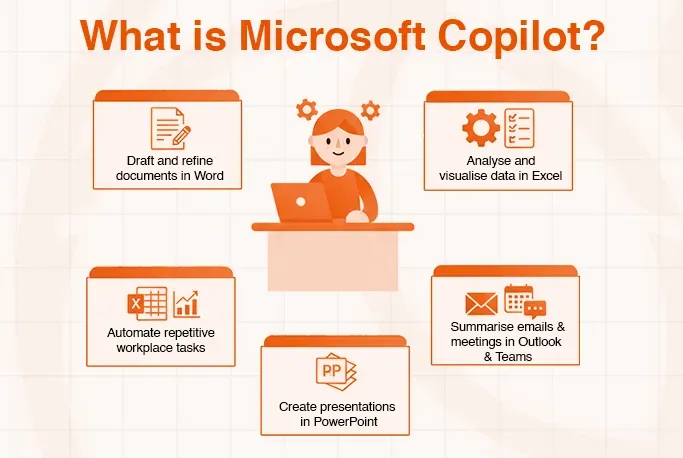
What is Microsoft Copilot?
Copilot is an integral part of the Microsoft 365 ecosystem, working in the background of your daily tools, offering assistance based on the files, emails, meetings, and data you already use. This tool is primarily designed for improving workplace productivity, especially for teams that are already a part of the Microsoft family.
With simple prompts, Copilot can:
- Draft and refine documents in Word
- Analyse and visualise data in Excel
- Create presentations in PowerPoint
- Summarise emails and meetings in Outlook and Teams
- Automate repetitive workplace tasks
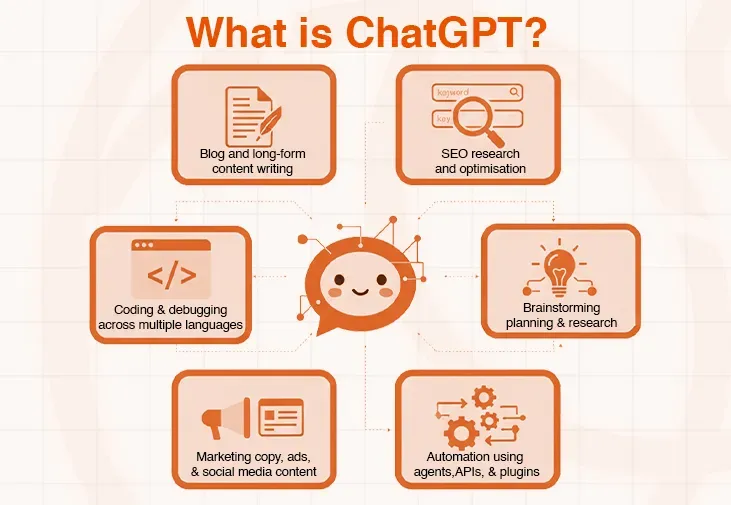
What is ChatGPT?
Pioneer of the AI tools, ChatGPT is a conversational AI tool developed by OpenAI, powered by the GPT‑5 family of models. Unlike Copilot, GPT is a standalone tool and operates independently of any single software suite. What makes ChatGPT a top-rated AI tool is its ease of use, flexibility, and creative depth.
ChatGPT is widely used for:
- Blog and long-form content writing
- SEO research and optimisation
- Coding and debugging across multiple languages
- Brainstorming, planning, and research
- Marketing copy, ads, and social media content
- Automation using agents, APIs, and plugins
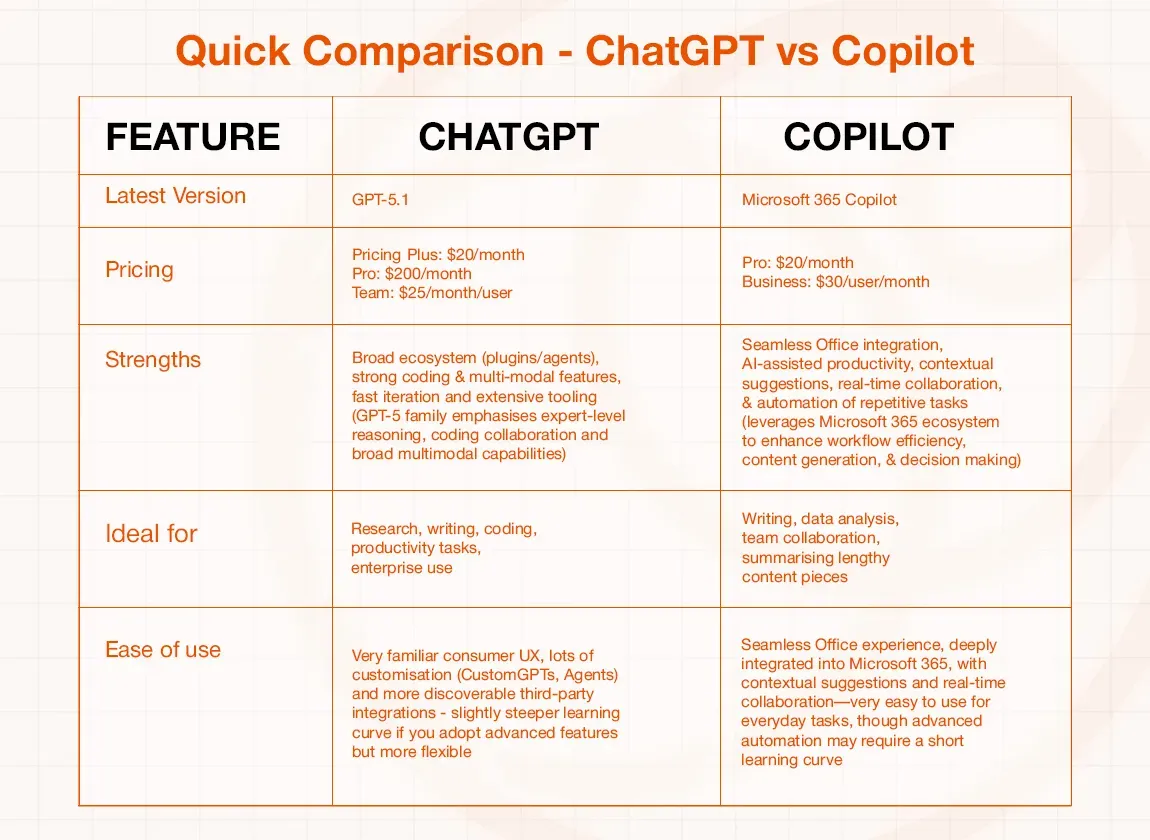
Quick Comparison - ChatGPT vs Copilot
Take a closer look at how top AI tools compare when it comes to performance, cost, capabilities, and user experience.
Plus: $20/month
Pro: $200/month
Team: $25/month/user
Pro: $20/month
Business: $30/user/month
Plus: $20/month
Pro: $200/month
Team: $25/month/user
COPILOT :Pro: $20/month
Business: $30/user/month
How Do ChatGPT and Copilot Stand Against Each Other?
Despite being AI tools that primarily help with content generation, ChatGPT and Copilot have noticeable differences, which make them suitable for different use cases. While ChatGPT is built as a flexible, standalone AI capable of handling creative, technical, and strategic tasks across industries, Copilot is designed as a productivity-first assistant that works best within Microsoft 365 workflows. Understanding these differences is key to choosing the right tool for your goals.
Here’s a list of similarities and differences between the two tools:
Similarities
- Both use advanced large language models to generate text, summarize content, and answer questions.
- Designed to save time by automating repetitive tasks and supporting faster decision-making.
- Capable of drafting emails, documents, reports, and creative content.
- Can help with explanations, planning, brainstorming, and logical tasks.
- Both evolve rapidly with frequent updates and new capabilities.
Differences:
1. Integration vs Independence
- Copilot is deeply embedded inside Microsoft 365 apps and relies on that ecosystem to deliver its best value.
- ChatGPT works independently and integrates with a wide range of third‑party tools via plugins, APIs, and agents.
2. Productivity vs Flexibility
- Copilot is optimised for structured workplace productivity and enterprise workflows.
- ChatGPT is more flexible, supporting creativity, research, development, and experimentation.
3. Customisation
- Copilot customisation is largely controlled through Microsoft’s enterprise settings.
- ChatGPT allows Custom GPTs, specialised agents, and open‑ended configurations for niche tasks.
4. Learning Curve
- Copilot feels intuitive for Microsoft users and requires minimal learning for basic tasks.
- ChatGPT may have a slightly steeper learning curve for advanced features, but it offers far greater control and adaptability.
5. Target Audience
- Copilot is best for organisations already committed to Microsoft tools.
- ChatGPT appeals to a broader audience, including individuals, creators, startups, developers, and enterprises.
The real distinction lies in how and where these tools are used.
ChatGPT vs Copilot Performance Overview: Which Is The Best AI Tool?
To make the most of each tool, it’s important to understand where it excels and where it falls short. Every AI platform is designed to perform certain tasks better than others, and using it for those specific purposes leads to higher-quality results. Below is a breakdown of how Copilot and ChatGPT compare across the key dimensions that matter most.
Strengths
ChatGPT:
- SEO-friendly, creative, high-engagement content. It writes faster and adapts easily to brand tone, making it ideal for blogs, landing pages, and marketing campaigns.
- Offers strong context retention as well, especially in GPT-5, but it’s more optimised for interactive, rapid-response tasks.
- Provides unmatched flexibility with plugins, agents, and a massive ecosystem - ideal for marketers, developers, and automation teams building AI-powered workflows.
- Offers affordable tiers for individuals and powerful Pro options for teams scaling high-volume content.
Copilot:
- Works seamlessly inside Word, Excel, PowerPoint, Outlook, and Teams for real-time productivity.
- Built on Microsoft’s security standards, making it ideal for corporate and regulated environments.
- Uses your emails, documents, meetings, and files to provide highly relevant suggestions and insights.
- Excels at summarizing documents, analyzing Excel data, creating reports, and automating routine workplace tasks.
Weaknesses
ChatGPT:
- ChatGPT can still produce confident but factually incorrect answers, especially on niche or rapidly changing topics.
- In very long chats or multi-document workflows, it may lose track of earlier details or shift tone over time.
- Memory isn’t perfect. While persistent memory exists, it doesn’t always handle highly complex, deeply layered, or extremely long-term context reliably.
- Unless users adjust their settings, conversation data may be used to improve the model, which can be a consideration for privacy-focused teams.
Copilot:
- Less flexible for imaginative writing, storytelling, and open-ended brainstorming.
- Best features require Microsoft 365 apps, reducing usefulness outside that environment.
- Advanced Copilot features often come with expensive enterprise or subscription plans.
- Responses can feel more structured and constrained, especially for casual or exploratory queries.
Choose Copilot for accurate and highly relevant suggestions inside regulated environments.
Choose ChatGPT for creative, flexible, and highly customizable workflows.
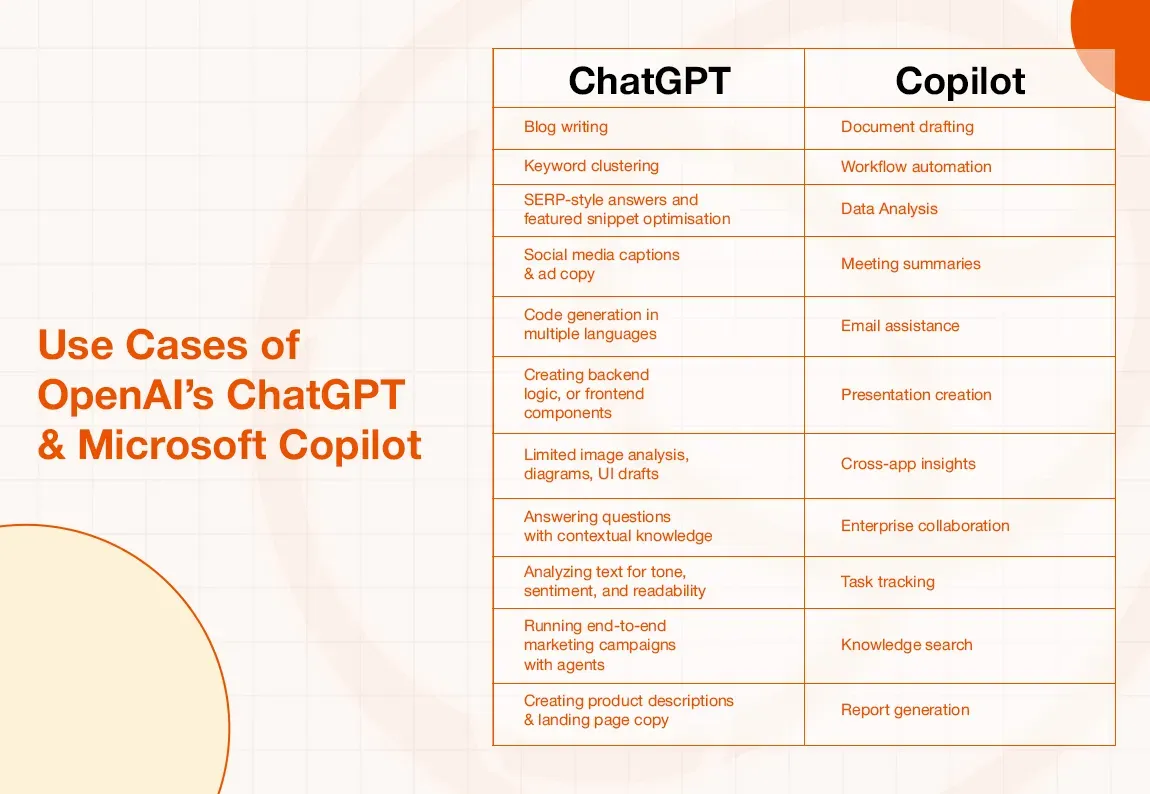
Use Cases of OpenAI’s ChatGPT & Microsoft Copilot
While both ChatGPT and Microsoft Copilot are powered by advanced AI models, the way they are used in real-world scenarios differs significantly. Each tool is designed to excel in specific workflows; ChatGPT thrives in creative, analytical, and open-ended tasks, whereas Copilot is built to enhance productivity within structured, enterprise environments.
Understanding their practical use cases helps businesses, creators, and professionals choose the right AI assistant based on their daily needs, goals, and existing tools.
Real-World Scenarios
A marketing team uses ChatGPT to generate blogs, ad copy, and keyword clusters, then refines final documents using Copilot in Word.
A corporate finance team relies on Copilot to analyze Excel data and generate reports, while using ChatGPT for market research and explanations of forecasting models.
A startup uses ChatGPT for product ideation, UX copy, and automation, while Copilot supports internal documentation and collaboration.
How I compared Copilot and ChatGPT
To keep things simple and fair, I used the free versions of both ChatGPT and Copilot to evaluate their performance in the real world. I used three different prompts to determine which tool was more effective at accomplishing what.
Prompt #1: “Can you generate a creative headline for an article based on healthy eating?”
ChatGPT’s response:

Copilot’s response:

Prompt #2: “Can you create an image for a blog based on cryptocurrency?”
ChatGPT:
Crashed twice when asked to create an image.
Copilot:

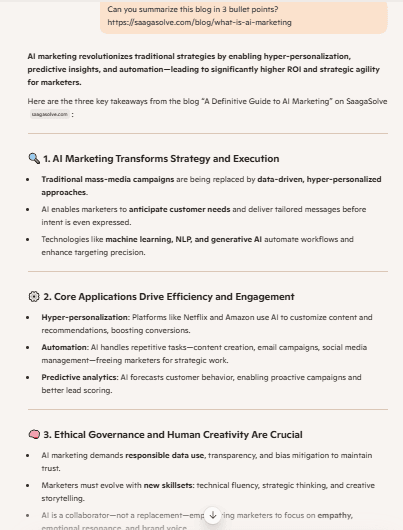
Prompt #3: “Can you summarize the following blog in 3 bullet points? https://saagasolve.com/blog/what-is-ai-marketing”
ChatGPT:
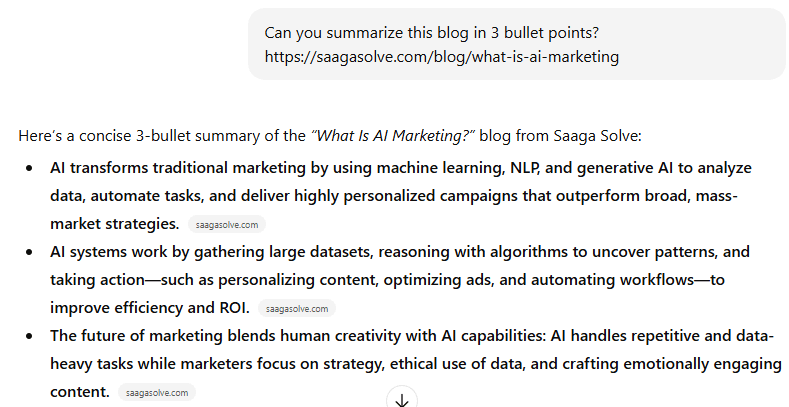
Copilot:
Result analysis:
ChatGPT performs better when it comes to creativity, while Copilot takes the lead in doing business-related tasks like summarizing blogs, analyzing data, and generating reports.
Copilot also seems more stable than GPT with a shorter response time and fewer instances of crashing mid-work. Its deep integration with Microsoft 365 tools further enhances productivity, making it a practical choice for teams already working within the Microsoft ecosystem. On the other hand, ChatGPT excels at brainstorming ideas, creating engaging content, and handling open-ended queries that require originality and flexibility. Ultimately, the choice between the two depends on whether the priority is creative exploration or streamlined business efficiency.
Choosing the correct AI tool for your workflow
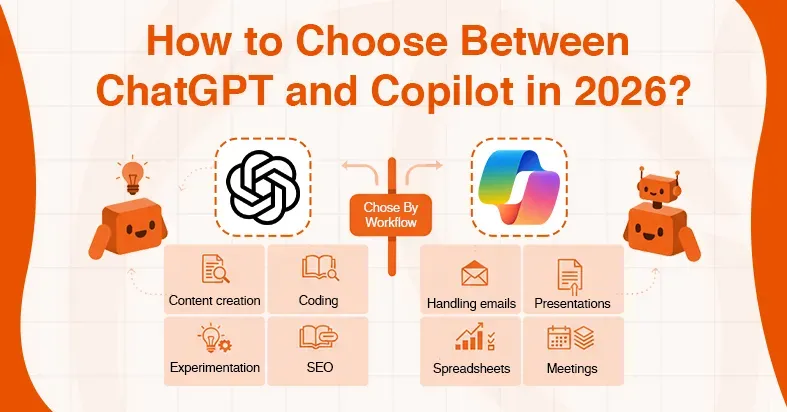
Choosing the right AI tool depends on your workflow, existing tool stack, and long-term goals. If your work revolves around content creation, SEO, coding, or experimentation, ChatGPT offers greater flexibility and creative control. However, if your daily tasks are deeply embedded in Microsoft 365, such as handling emails, spreadsheets, presentations, and meetings, Copilot provides a more seamless and secure experience.
Conclusion
When it comes to choosing between ChatGPT and Microsoft Copilot, the “winning edge” depends largely on how and where you plan to use AI. ChatGPT excels in creativity, flexibility, and depth of conversation, making it a strong choice for content creation, SEO tasks, coding across multiple languages, and open-ended problem-solving. Copilot, on the other hand, shines in productivity and enterprise workflows, with tight integration into Microsoft 365 apps, context-aware assistance, and robust security for professional environments.